
MDEdit Download

A Markdown editor for the folder you already have.

MDEdit opens a folder on your Mac and shows it as a binder of notes. Every note stays a plain text file, so nothing is locked in and nothing needs importing.

Download for Mac

Needs macOS 14 or later. No account. All releases

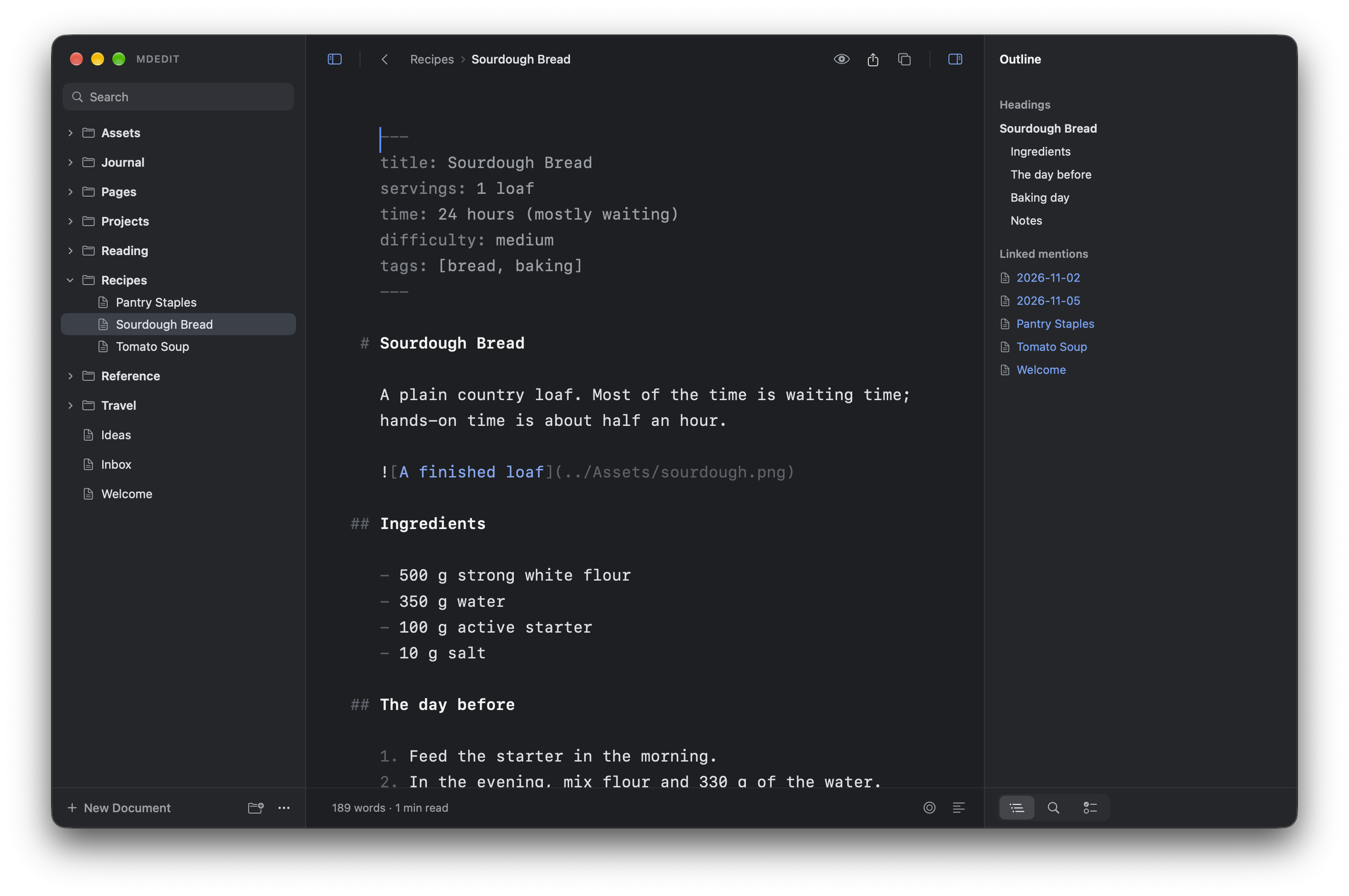
MDEdit with a folder of notes on the left, a note being written in the middle, and its outline and linked notes on the right

Templates that read your notes

Write an HTML page with a few template tags and MDEdit fills it in from the folder: an index of your notes, a task list, a summary of every note under its Summary heading. Preview builds the page. It only reads, and nothing is written back.

An HTML template in the editor, with template tags for listing tasksThe page the template builds: open tasks from the notes, overdue ones in red

Agents suggest, you decide

Turn on the local agent server and a tool such as Claude Code can propose edits to the note you have open. Each one arrives in the Review tab as a diff with the agent's reason. Nothing changes until you accept it.

A note with the Review tab open beside it, listing an agent's suggested fixes as removed and added lines with Reject and Accept buttons

Focus mode, with a typewriter

Distraction free hides everything but the note. Typewriter mode keeps the line you are typing in the middle of the window, so you never write at the bottom edge of the screen.

A note in distraction free mode: the paragraph being typed is bright and the rest of the page fades away

Go to any file in a few keystrokes

Press ⇧⌘O and type a few letters of a name or path, in order but not next to each other. sou finds Sourdough Bread.md. Return opens it.

The Go to File box open over a note, with files that match the letters typed

Open a folder, get a binder

Point MDEdit at any folder. The subfolders and notes show up in a sidebar and open with a click. Rename, move, trash, or drag files in from Finder. When you quit, the folder is exactly as you left it.

Write in Markdown, read it typeset

In Write mode the Markdown stays on screen, lightly styled as you type. Switch to View and the same note is set in a serif or sans face made for reading, with proper quotes and dashes.

Link notes to each other

Type [[ and pick a note. The side panel lists the headings of the note you're in and every note that links back to it. Front matter turns into a small table when you read.

Search the whole folder

Find and replace in one note or in all of them. You see a diff before anything changes, and a single undo puts every file back if none of them has been touched since.

HTML, JSON and YAML too

They open in the same editor, as code. Preview shows an HTML page, indented JSON, or YAML as a table. An HTML file with template tags can build an index of your notes, reading them and never changing them.

Careful with your files

MDEdit runs in the macOS sandbox and only touches the folder you open. It saves as you type and won't overwrite a file that changed behind its back. No account, no sync service, no tracking, and no network connections of its own.

Let an agent suggest edits

Turn on the local agent server in Settings and a tool such as Claude Code can read the note you have open and propose changes over MCP. They show up in a Review tab as diffs, and nothing changes until you accept. It's off until you switch it on.

Questions

What is MDEdit?

MDEdit is a Markdown editor for the Mac. It opens a folder as a project and edits the .md and .txt files in it directly, with wiki links, backlinks, find and replace across the folder, and a typeset reading view.

Where are my notes stored?

Where they already are. MDEdit works on the files in the folder you open. It doesn't keep a copy, a database or a library of its own.

Does MDEdit need an account or an internet connection?

No to both. It makes no network connections of its own. Pictures and stylesheets from the web load in a note only if you switch that on in Settings.

Is MDEdit open source?

Yes. MDEdit is free and released under the MIT licence. The source, the issue tracker and every release are on GitHub.

Which version of macOS does it need?

macOS 14 (Sonoma) or later. There is no Windows, iPhone or iPad version.

Does it support wiki links and backlinks?

Yes. [[Note]], [[Note|alias]], [[Note#Heading]] and [[folder/Note]] all work, with a list of notes as you type. The side panel shows the notes that link back to the one you have open.

Can I open a folder from another notes app?

If its notes are Markdown or text files, yes. MDEdit reads and saves them where they are, so the folder still works in whatever else you use on it.

Can an AI agent edit my notes?

Only if you let one. The local agent server is off until you turn it on in Settings. An agent can then read the note you have open and suggest changes, which appear in a Review tab as a diff. Nothing changes until you accept it.

How do I install it?

Download the disk image, open it and drag MDEdit into Applications. It is signed and notarised by Apple, so it opens like any other app.

Try it on a folder of your own.

Download for Mac

Needs macOS 14 or later. All releases